Account Update
4 min
Call accountUpdate when a user attempts to update the address, payment method, password, or other account information post authentication on your website.
Timing
The API call should come to the Interceptas Platform:
- After a user attempts to update an account.
- After they pass error handling and you retrieve their IP Address and User Agent.
- Before you update the account.
Important Considerations
- When calling accountUpdate we recommend you send all values associated with the account even if they are not being updated.
- previousValues: Send all values from before the update.
- updatedValues: Send all values from after the update (changed or unchanged).
- emailAddress is an important field and should always be present with the value post-update. This means, if your site does not allow email updates, the same email address will be passed 3 times in the emailAddress field, the previousValues block, and the updatedValues block.
- We suggest you call the accountUpdate event even if something we don't collect is changed.
Example: Some clients have preferences such as a user's avatar or preferred rental car type.
Flow
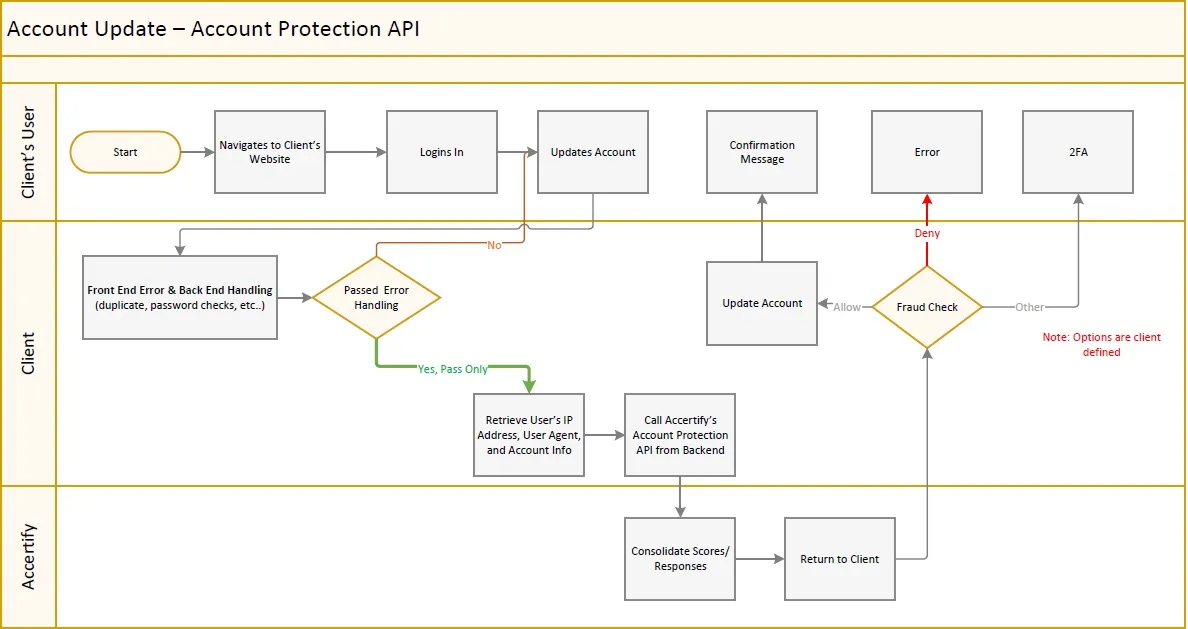
Account Update flow
- User logs in.
- User goes to Account Update and changes something (address, payment methods, personal info).
- Client processes frontend validation to ensure all fields are filled in properly.
- Send changes to backend.
- Client's backend server calls Accertify with All previousValues (before the change) and updatedValues (after change) regardless if they changed or not.
See also: